React with the Fetch API
This lesson will show you how to make a React application that GETs data from an API and displays it.
Set Up
Create a React App on replit.com or using npx create-react-app
in the terminal. Get rid of any CSS in App.css. We will be modifying App.jsx.
useEffect hook
The useEffect hook allows you to run a function when…
- The component initially loads.
- A specific piece of data (a prop or member of state) changes.
For our project, we will be running a function that gets data from a server via an API and displaying it.
Replace the App.jsx in your project with the following:
import React, { useEffect, useState } from "react"
import "./App.css"

function App() {
  const [courses, setCourses] = useState([])

  useEffect(() => {
    setCourses(["CS", "IT"])
  }, [])

  return <main>{courses}</main>
}

export default App
useEffect Parameters
The first parameter of useEffect is the function you want to run. The second parameter is the
dependency array, which is empty if you want the function to be called when you load the
component.
Displaying Courses with
Array.map()
Right now, this code will just shove all the courses together like this:
Result:
CSIT
To display each course separately, we can use JavaScript’s Array.map()
method, which will return a different JSX element for each course in our courses array
(replace the return <main>...</main> in App.jsx with the below code).
return (
  <ul>
    {courses.map((course, i) => (
      <li key={i}>{course}</li>
    ))}
  </ul>
)
Result:
- CS
- IT
API: Application Programming Interface
An API (Application Programming Interface) is a layer in an application that allows a client to access data and features from a server.
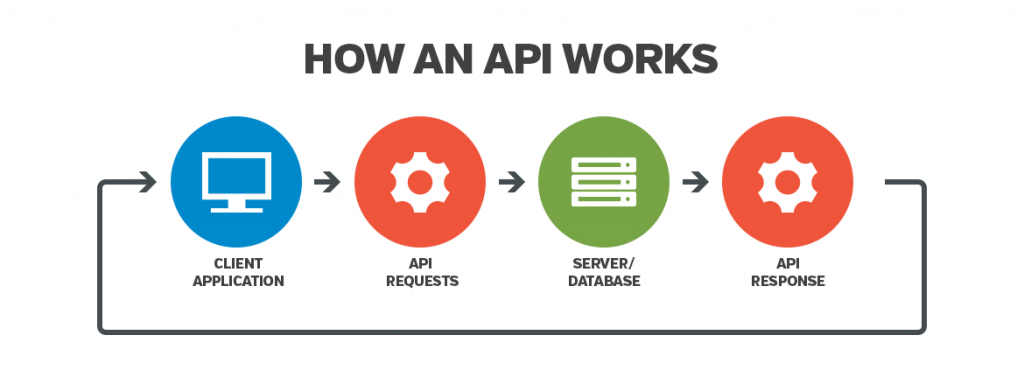
Instead of typing in course information to display ourselves, let’s get this data from Merit Academy’s API.
In a separate tab, visit https://meritacademy.herokuapp.com/api/courses/?format=json to see the data related to Merit CS Courses. This data is represented as JSON (JavaScript Object Notation). All the courses are listed below in an array.
JavaScript Fetch API
In our useEffect hook, we can GET this course data and store it in our state. We will use the
asynchronous Fetch API to get the
information and store it. It is asynchronous because we don’t know how long it will take to
get information from the server.
I strongly recommend that you read this page: MDN async await.
useEffect(() => {
  // We have to wrap fetch in an async function
  // because it's an asynchronous process that we
  // have to await for
  async function getCourses() {
    const response = await fetch(
      "https://meritacademy.herokuapp.com/api/courses/?format=json"
    )
    // Get the json from the response
    const courses = await response.json()
    console.log(courses)
    setCourses(courses)
  }

  // Call the async function
  getCourses()
}, [])
If you check the console, the data will all be there. It is not displaying in the browser yet because we need to modify what we return from our component.
Return Course Details
You can access fields from your JSON object with the . operator
(e.g. course.slug) and display them in your JSX.
return (
  <ul>
    {courses.map((course, i) => (
      <li key={i}>
        <h4>{course.name}</h4>
        <p>Counts for {course.countsFor}</p>
      </li>
    ))}
  </ul>
)
Final Code for App.jsx
import React, { useEffect, useState } from "react"
import "./App.css"

function App() {
  const [courses, setCourses] = useState([])

  useEffect(() => {
    async function getCourses() {
      const response = await fetch(
        "https://meritacademy.herokuapp.com/api/courses/?format=json"
      )
      const courses = await response.json()
      setCourses(courses)
    }

    getCourses()
  }, [])

  return (
    <ul>
      {courses.map((course, i) => (
        <li key={i}>
          <h4>{course.name}</h4>
          <p>Counts for {course.countsFor}</p>
        </li>
      ))}
    </ul>
  )
}

export default App
Challenges
- Display the
course.descriptionby usingArray.map(). - Display the
course.unitsby usingArray.map(). - Display the
course.tagsby usingArray.map().